Disney's Hexed World of Witches How to Claim Free Hexed UGC
Earn Stars, hit the live claim stand, and pull limited pets, hair, and cloaks into your inventory.
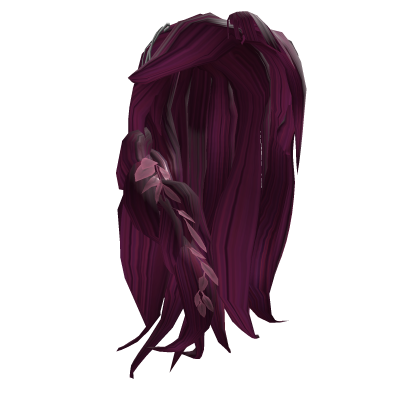
Free limited UGC in Disney’s Hexed World of Witches is claimed with Stars, not with typed promo codes. This walkthrough covers region access, farming to the usual 50 Stars threshold, using claim stands, and confirming items in Roblox inventory. Pair it with the Codes hub for reward status and the UGC drop schedule for live windows.
Before you start
- Use a Roblox account that can join experiences and receive limited UGC.
- Open the official place: Disney’s Hexed World of Witches (universe
10766720492). - Skim Getting Started if this is your first session—controls and early hunt goals save time.
- Check whether the item you want is currently stocked. Beef Roger, Billie’s Hair, and Billie’s Cloak each have their own windows; see Beef Roger and Billie items.
Step 1 — Fix region access (VPN if required)
Some players outside the United States report that the experience will not load, claim stands stay locked, or the limited never appears until they connect through a USA VPN. That requirement can change by region and over time.
Recommended flow:
- If the place page errors or you cannot join, enable a reputable USA VPN endpoint.
- Restart Roblox fully after the VPN connects.
- Join again from the official game URL.
- If you can play but a claim fails, retry the stand once with VPN on before assuming you are out of Stars or stock.
VPN use is optional when your region already has access. Never share account credentials with “claim services”—complete the stand interaction yourself.
Step 2 — Enter the experience and learn the loop
Once inside Hexe, treat the session as a scavenger hunt: explore town, forest, and swamp, brew potions, unlock powers, and clear hunt objectives. Stars come from progressing those activities, not from a Codes UI. If you need movement or combat shortcuts, review the players hub for Mouse Telekinesis, F Push, X Slash, Z Surround, T Resize, C Magic Blast, Shift Dash, and Space Jump/Fly.
New players should prioritize unlocking basic powers early so traversal puzzles do not stall Star gains. The tier list helps you decide which abilities to lean on first. For dense farm routes, open the farm Stars guide.
Step 3 — Earn about 50 Stars
Most free Hexed UGC stands cost roughly 50 Stars each. Plan one focused farm session per item instead of hopping in and out:
- Clear obvious town discoverables first for quick early Stars.
- Move into forest and swamp objectives when town density drops.
- Finish potion and power unlocks that gate later hunt steps.
- Avoid idle lobbies; Stars come from completing content.
Track your total on the in-experience HUD. When you approach 50, navigate toward the active claim area instead of starting a long side route. If a drop is timed (for example a noon EST cloak window), farm ahead of time so you are ready when the stand opens.
Step 4 — Use the claim stand
When a free UGC stand is live:
- Walk up to the stand for the item you want (pet, hair, or cloak).
- Interact / confirm the Star spend when prompted.
- Wait for the success feedback—do not spam the prompt or leave the server mid-claim.
- If the stand says sold out, stop grinding that SKU and check the UGC drop schedule for the next window or alternate reward.
Only spend Stars on the item you intend to keep. Promo stock can deplete quickly during peak hours after launch (November 13, 2026) and around later drop dates.
Step 5 — Confirm inventory and equip
- Open Roblox Inventory / Avatar items (desktop or app).
- Look under the matching category: shoulder accessories / pets, hair, or outerwear / cloaks.
- Equip the item and rejoin a server if it does not show immediately.
- If the item is missing after several minutes, verify Star balance (spend may have failed), VPN region, and whether the stand actually completed.
Screenshot the stand success message if you need to compare against a later support ticket—but remember this wiki cannot restore limiteds; only Roblox / the experience owners can.
Common claim failures
| Symptom | Likely cause | What to try |
|---|---|---|
| Cannot join place | Region lock | USA VPN, restart Roblox |
| Stand does nothing | Not enough Stars / wrong stand | Farm to ~50, confirm correct item stand |
| Sold out message | Limited stock gone | Wait for next drop; watch Updates |
| Stars spent, no item | Lag or region sync | Rejoin, check inventory, retry with VPN |
| Looking for text codes | No Codes UI | Return to the Codes hub—Stars are the path |
Optional tools vs legitimate play
Hard platforming can slow Star farms. Some players use universal fly / noclip helpers documented on exploration helpers. Those tools carry executor and ban risk—read the safety disclaimer there. Learning intended powers from the Guides hub is safer for long-term accounts and matches how the scavenger hunt was designed.
After a successful claim
- Equip and show off the limited on your avatar.
- Farm toward the next SKU if another stand is live.
- Revisit this page whenever a new Hexed UGC wave starts.
- Cross-link friends to Getting Started so their first Stars session is efficient.
Stay patient during peak drop minutes. Servers fill fast, stands can hitch, and stock numbers move quickly—having Stars banked before the timer is the strongest advantage you can bring.
Frequently Asked Questions
Quick answers for Hexed Roblox witches.
How many Stars do free Hexed UGC items usually cost?
Most known limiteds—Beef Roger Shoulder Pet, Billie's Hair, and Billie's Cloak—typically cost about 50 Stars at their claim stands.
Do I need a VPN to claim?
Sometimes. Players in certain regions need a USA VPN to join or finish a claim. Try without one first; enable VPN if join or inventory delivery fails.
Where do claimed items appear?
In your Roblox inventory under the matching accessory category. Equip from Avatar; rejoin if the item does not show right away.
What if the stand says sold out?
Limited stock is gone for that wave. Check the UGC drop schedule and Updates hub for the next window.
Is there a promo code instead of Stars?
Not currently. See the Codes hub—Hexed rewards are Star-based claims until a verified text code appears.